


Equalizer & Extra Bass Booster
4.9400.00 Reviews
App Specs
- Version
- 1.2.7
- Updated On
- License
- Free
- Downloads
- 500,000+
- Developer
- Echo Player - Music, MP3 & Equalizer
- Categories
- Music & Audio
- Platform
- Android
Screenshots
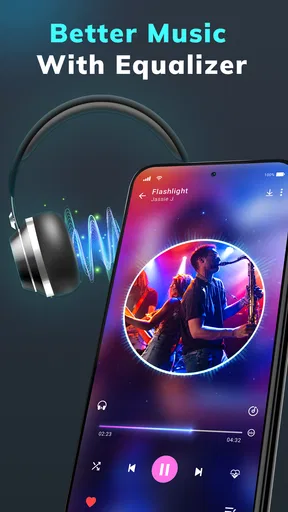
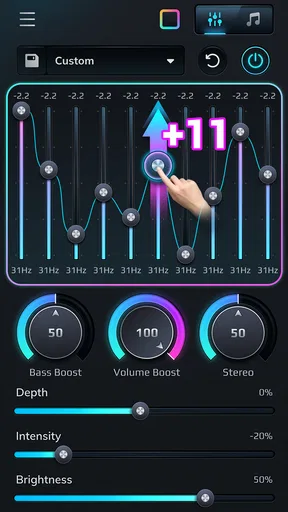

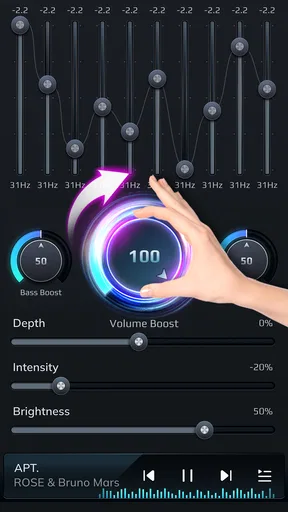
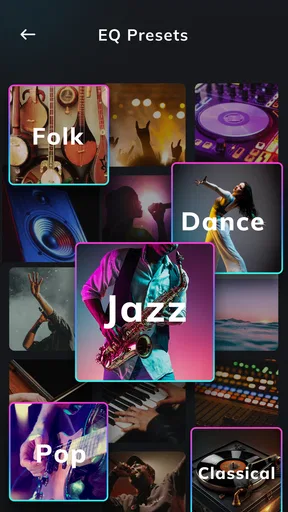
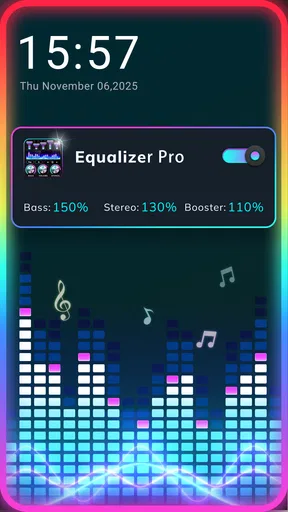

 Analysis by AppCompare
I treat a phone equalizer as a small creative tool: it lets me shape the sound I hear without editing the music file itself. That distinction matters with Equalizer & Extra Bass Booster. I can adjust playback to suit my headphones, a particular recording, or a noisy commute, but those changes are for listening rather than producing a new mix. If you want a quick way to explore a fuller sound, it is an approachable place to start.
A listening goal before touching the sliders
When I try an equalizer, I first decide what is bothering me. Is the bass too thin on a familiar track? Do voices seem buried? Does a bright recording become tiring through my headphones? Starting with one clear question makes it easier to judge whether a change helps, instead of raising every control and hoping the result sounds better.
That approach suits this app’s straightforward focus. It is a free music and audio app from Echo Player - Music, MP3 & Equalizer, built around sound adjustment rather than a full recording studio. The audience rating is 4.9 from around 7.7 thousand ratings, and it has been installed over 500 thousand times. Those figures suggest that many listeners have found the basic idea useful, though I would still judge the sound on my own device and headphones.
If you are deciding whether it fits your setup, one practical question is whether you want changes that follow you everywhere. An equalizer app can be useful for everyday listening, but it is not the same as changing the source audio or making an edit that another person will hear in the original track. I would use it to tune my own playback, not as a substitute for mastering or sharing a revised recording.
Getting Started with Equalizer & Extra Bass Booster
First things first, installing Equalizer & Extra Bass Booster is a breeze. Available on both Android and iOS, it doesn't take up much space, which is great if you're like me and constantly battling with storage issues. As soon as you open it, the interface is super intuitive. No need to dig through complex menus, which I appreciate because, let's face it, who has time for that?
The app offers a variety of presets for different music genres. Whether you're into rock, pop, or classical, there’s something for everyone. And if you’re feeling adventurous, you can customize the settings to your liking, tweaking each frequency band to get that perfect sound. The ability to personalize the sound output is a game-changer for audiophiles.
Features That Stand Out
Now, onto the features that really make this app shine. The extra bass booster is, in a word, phenomenal. It lets you pump up the bass to levels that make your ears tingle (in a good way). I tried it with a few bass-heavy tracks, and the difference was night and day. The sound becomes fuller and more immersive, which is perfect for anyone who loves feeling the music as much as hearing it.
Worth Reading Before You Choose

Flipboard Shows What News Apps Must Do Beyond the Feed

Switching to Android Auto Means Rethinking Your Driving Routine

Google Calendar Makes a Crowded Week Easier to Manage

Ludo King Makes the Most of the Minutes Between Plans

Baby Panda World Brings Quick Play to Modern Phones, but Its Game Library Feels Busy

ESPN’s Live Game View Makes Following Close Games Easier
The app also includes a virtualizer, which adds a spatial effect to your audio. It’s like you’re sitting in the middle of a surround sound system. Pretty cool, right? Plus, it comes with a volume booster that can take your sound up a notch without any noticeable distortion.
My Experience Using the App
Using Equalizer & Extra Bass Booster was a smooth ride. I tested it with various headphones and speakers, and it consistently delivered impressive results. One thing I noticed is that it significantly enhances the audio experience when streaming music from platforms like Spotify or Apple Music. The app works seamlessly in the background, which means you can set it up and forget about it while enjoying your tunes.
The user interface is clean and user-friendly. Everything you need is just a tap away, and I found it easy to switch between presets or adjust the equalizer manually. The app also includes a handy feature that allows you to save your custom settings, so you don’t have to start from scratch each time.
Small adjustments, better comparisons
A useful way to get more from the controls is to compare changes at a similar listening volume. A louder setting can seem more exciting even when it is not actually clearer, so I make a small adjustment, replay the same short section, and switch back to the original before deciding. That quick A/B habit helps me avoid mistaking extra loudness or bass for improved detail.
I also treat presets as starting points rather than answers. A genre label cannot account for the recording, headphones, or room I am using. If a preset makes vocals less clear, I would rather lower the bass slightly than keep it simply because the label sounds right. For a podcast, where speech intelligibility matters more than a dramatic low end, a restrained custom setting is often the sensible choice.
There is a trade-off to stronger enhancement: extra bass and volume can make some tracks feel weightier, but too much can blur vocals or make listening tiring. I would begin with modest changes, especially with earbuds, and give my ears a short break if I notice myself continually turning the sound up. The booster is most useful when it corrects a playback setup that feels weak, not when it is pushed to maximum for every song.
Where it fits in an everyday routine
Imagine putting on headphones during a bus ride after switching from a bass-heavy playlist to a spoken podcast. Rather than leaving one exaggerated setting in place, I would use a familiar preset for music and then reduce the low end for voices. A saved custom sound can make that switch less fiddly, while a quick return to the original gives me a reference if the altered sound starts feeling unnatural.
That same practical approach works at home: I might choose a gentler adjustment for a small speaker and a different balance for headphones. The point is not to chase one “perfect” curve but to account for how the output device changes what I hear. The app is most appealing to listeners who enjoy a little hands-on tuning and want playback to feel more personal without learning audio-production software.
Compared with the equalizer controls built into a music player, a dedicated tool can be convenient when I want to experiment with bass, spatial effect, and volume in one place. The built-in option may still be the better choice if I only need a simple adjustment inside one service or prefer not to keep a separate sound utility running. For serious editing, a desktop audio workstation is in another category entirely: it changes and exports creative work, while this app is about listening to audio through the phone.
One question people often have is whether an equalizer can improve every track. I would not expect that. A recording that already sounds balanced may gain little, and boosting weak or noisy audio cannot restore detail that is not there. Another sensible question is whether a saved setting will suit every speaker; I would check it again when changing output devices rather than assuming headphones and speakers need the same treatment.
Who should choose a different tool
I would skip this kind of app if I need to edit a song, export a processed file, or send collaborators a finished audio version. Its role is playback enhancement, not a production workflow from recording through delivery. It may also be unnecessary if my phone or preferred player already gives me the controls I want and I rarely change them.
For a listener who likes tuning sound but does not want a complicated interface, the balance is more attractive. The age rating is Everyone, it is free, and version 1.2.2 runs on Android 5.0 or later. Those details make it accessible to a broad range of Android users; the strongest reason to try it, though, is still whether its adjustments improve the particular headphones, speakers, and audio you use.
Is It Worth It?
So, is Equalizer & Extra Bass Booster worth downloading? In my opinion, absolutely. It transforms your listening experience, making it richer and more dynamic. Whether you're a casual listener or a hardcore music enthusiast, this app has something to offer.
One of the standout qualities is its versatility. It’s not just limited to music; it enhances audio for videos and podcasts too, which is a nice touch. I found myself re-listening to some of my favorite tracks just to enjoy the enhanced sound quality.
In conclusion, if you're looking for a way to take your audio experience to the next level without breaking the bank, give Equalizer & Extra Bass Booster a shot. It's easy to use, packed with features, and, most importantly, it delivers on its promise of boosting sound quality. So go ahead, download it, and let your ears indulge in the superior sound.
My final listening take
I would recommend it to someone who wants an easy, personal way to make music, videos, or spoken audio feel more suited to their setup, and who is happy to adjust settings by ear. Its appeal is less about creating a universally correct sound and more about having convenient control over the one coming from your own phone.
My most useful tip is to keep a conservative custom setting for everyday use, then experiment briefly with stronger bass or spatial effects when a track calls for it. If you value faithful, unchanged playback, need to deliver edited audio, or prefer not to manage another sound control, the default player may be a better fit. For everyone else, this is a simple tool worth trying with a familiar song and a light touch.
Pros
- Boosts audio for a richer sound.
- Customizable equalizer settings.
- User-friendly interface.
- Works with most music apps.
- Improves headphone output quality.
Cons
- May drain battery faster.
- Ads can be intrusive at times.
- Some features are premium only.
- Might not support all devices.
- Requires permissions for full use.
FAQs for Equalizer & Extra Bass Booster
What features does Equalizer & Extra Bass Booster offer?
Equalizer & Extra Bass Booster provides users with a customizable audio experience by offering a range of sound effects and presets. It includes a 5-band equalizer, bass booster, virtualizer, and reverb presets for various music genres. This allows users to enhance their audio output according to personal preferences and listening environments.
Is Equalizer & Extra Bass Booster compatible with all music players?
Yes, Equalizer & Extra Bass Booster is designed to work with a wide array of music players and streaming apps on your device. However, compatibility can vary depending on the specific apps and device configurations. It's recommended to check the app's compatibility with your preferred music player for the best experience.
Does Equalizer & Extra Bass Booster affect battery consumption?
Enhancing audio with Equalizer & Extra Bass Booster may lead to slightly increased battery consumption due to the processing power required for audio adjustments. However, the impact is generally minimal. It's advisable to monitor battery usage to ensure it aligns with your expectations when using the app frequently.
Is Equalizer & Extra Bass Booster free to use, or does it have in-app purchases?
Equalizer & Extra Bass Booster offers a free version with essential features. However, to unlock advanced options and remove ads, users can opt for in-app purchases. The premium version provides a more comprehensive audio experience with additional customization options and an ad-free environment.
How user-friendly is the interface of Equalizer & Extra Bass Booster?
The interface of Equalizer & Extra Bass Booster is designed with user-friendliness in mind, featuring intuitive controls and easy navigation. Users can effortlessly adjust settings and switch between presets. It caters to both beginners and audio enthusiasts, making it simple to enhance audio without a steep learning curve.


